Developer Hub
This section guides you through how to develop with accsyn.
Introduction
accsyn is designed from the ground up to facilitate API-driven file transfers and compute workflows, enabling advanced automated workflows and integration into third-party tools.
This developer hub covers:
- The accsyn Python API. Being API-first, all you can do within an accsyn GUI can be done through the API; in fact, all internal communication within accsyn is API-driven.
- The accsyn JavaScript API. The same session API for Node.js and browsers.
- Hooks. Have scripts run on your server on specific events (BYOS only).
- Publish. Set up a publishing workflow, facilitating ingestion of remote work into your production pipeline (BYOS only).
- Rendering/compute. Use accsyn for heavy compute processing, such as 3D image rendering, 2D compositing render, GPU processing (ML) or any custom resource-intensive calculation that needs to run in the background (BYOS only).
Developing with accsyn
Before diving into the accsyn API, we recommend learning about the terms and definitions used in accsyn. Here is a schematic covering the basic internal accsyn entities and their relationships:
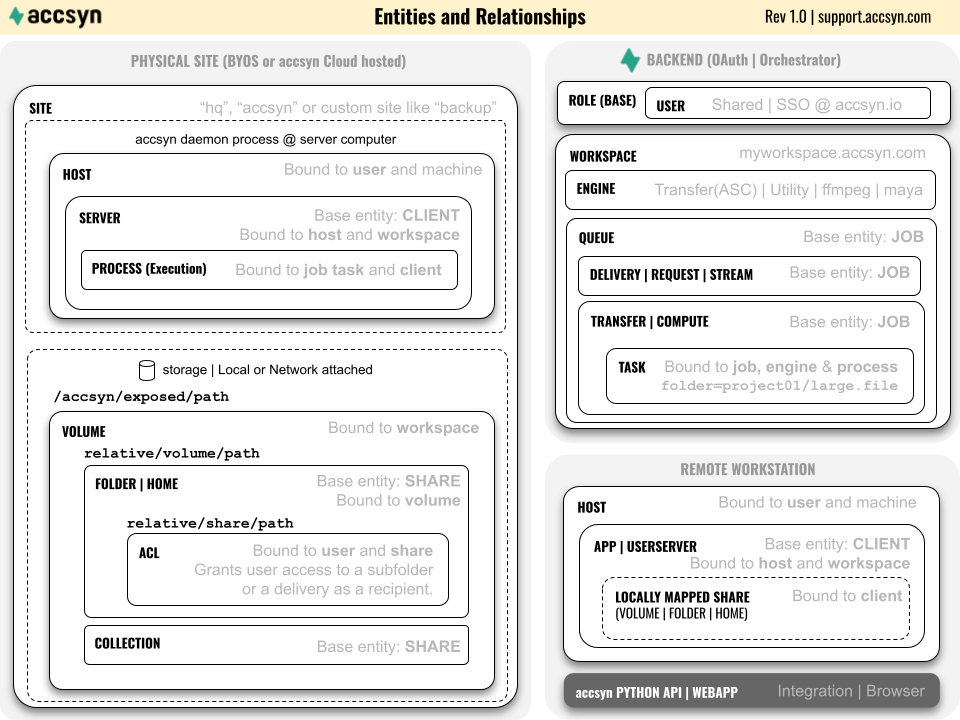
For a complete list of accsyn terms, please refer to the API glossary page.
Python API
Learn how to programmatically launch and manage file transfers, create deliveries and manage file sharing.
JavaScript API
The same workspace API for Node.js 18+ and browsers.
Job JSON specification
Learn the accsyn job JSON format, for use with the Python API and workflows in general.
Note: the following features are currently only available for BYOS Workspaces.
Hooks
Configure scripts that will be executed by an accsyn server on events such as job submit and job done.
Publish
Enable controlled validation and ingest of data into your production pipeline.
Rendering/compute
Set up a render farm driven by highly configurable Python scripted engines, multi-site enabled.