Queue administration
This guide shows how to administrate your workspace queues.
Prerequisites:
- Logged on as an administrator to https://accsyn.io/admin/queues.
What is a queue?
A queue is an accsyn job entity acting as a container for ordered jobs having a fixed priority.
- A workspace can have multiple queues, by default three queues are created from start: High, Medium and Low.
- Priority is a number between 0 and 1000, jobs in higher priority queues get executed before those in low priority.
- One queue must be designated as the "default", the default queue is where new jobs are put when no queue constraints are given at submission.
Queue list
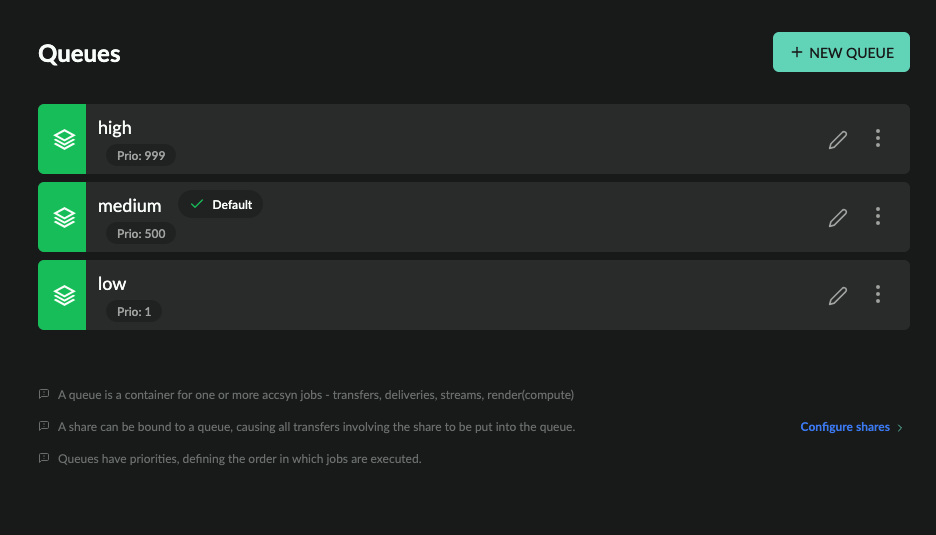
The queue list shows all active queues within your workspace:
- Status indicator; Green is enabled, orange is disabled.
- Name (code); The workspace unique name of the queue.
- Default indicator - points out the default queue where jobs/deliveries are assigned if no queue constraints are given on submit.
- Priority: Dictates which priority job(s) beneath the queue should be given, defined as a positive number between 0-1000.
- Description; (Optional) The description of queue.
- Edit (pen) button.
- Menu button.
Queue menu:
- Edit; Bring up queue editor.
- Disable; Disable the queue.
- Enable; Enable the queue.
- Duplicate; Create a copy of the queue (settings, priority, status, description, metadata and config). You will be asked for a name for the new queue; its API code is generated from that name and made unique among existing queues.
- Logs; Show log events related to the queue.
- Delete; Delete the queue.
Create a new queue
To create a new queue, click the NEW QUEUE button in the upper right corner.
- Code (name); The workspace unique name to give the queue, can contain letters, numbers, dot(.), underscore(_) or hyphen(-).
- Priority; The priority to give queue.
- Description; (Optional) The description to give queue.
When done, click CREATE to have the queue created. Click the cross (X) icon in upper right corner to cancel creation.
Duplicate a queue
To duplicate a queue, open the menu (three dots icon) on the right hand side and choose Duplicate.
Enter a name for the new queue and confirm. The following attributes are copied from the source queue:
- Priority and status
- Description
- Metadata and config (including transfer, job and email overrides, and hooks)
- Parent
The new queue is not marked as the workspace default or compute-default queue. Its API code is generated from the name you enter; if that code already exists, a number (1, 2, …) is appended until it is unique.
Edit a queue
To edit a queue, click on it in the list.
Attributes
Edit queue attributes such as code, priority and default.
Transfer settings
Override global accsyn protocol (ASC) file transfer settings for the queue.
NOTE: Transfer settings can be further overridden on individual job level.
Job settings
Override global job settings for the queue.
NOTE: Job settings can be further overridden on individual job level.
Email Settings
Override global email rules for jobs within this queue.
Hooks
Define additional hooks, complementing workspace global hooks.
Metadata
Define metadata for this queue, which will be appended to upstream metadata and provided to queue jobs with Workflows - API calls, engine execution, hooks execution, and so on.
Delete a queue
To delete a queue, open the menu (three dots icon) on the right hand side and choose Delete.
NOTE: This cannot be undone.
Any job(s) that reside in the queue will be moved to the default queue. If this is the only queue left, deletion will fail.