Deliver title media
Deliver tagged media and folders from the Media Vault using the Desktop App. Transfers to recipients use the secure, accelerated ASC protocol when they download with the app. For general (non-Vault) deliveries, see Create a delivery.
Deliver media
- Sign in to the Desktop App on a Cloud (non-BYOS) workspace and open the title.
- Select the media to deliver, then click Deliver, or right-click → Deliver:
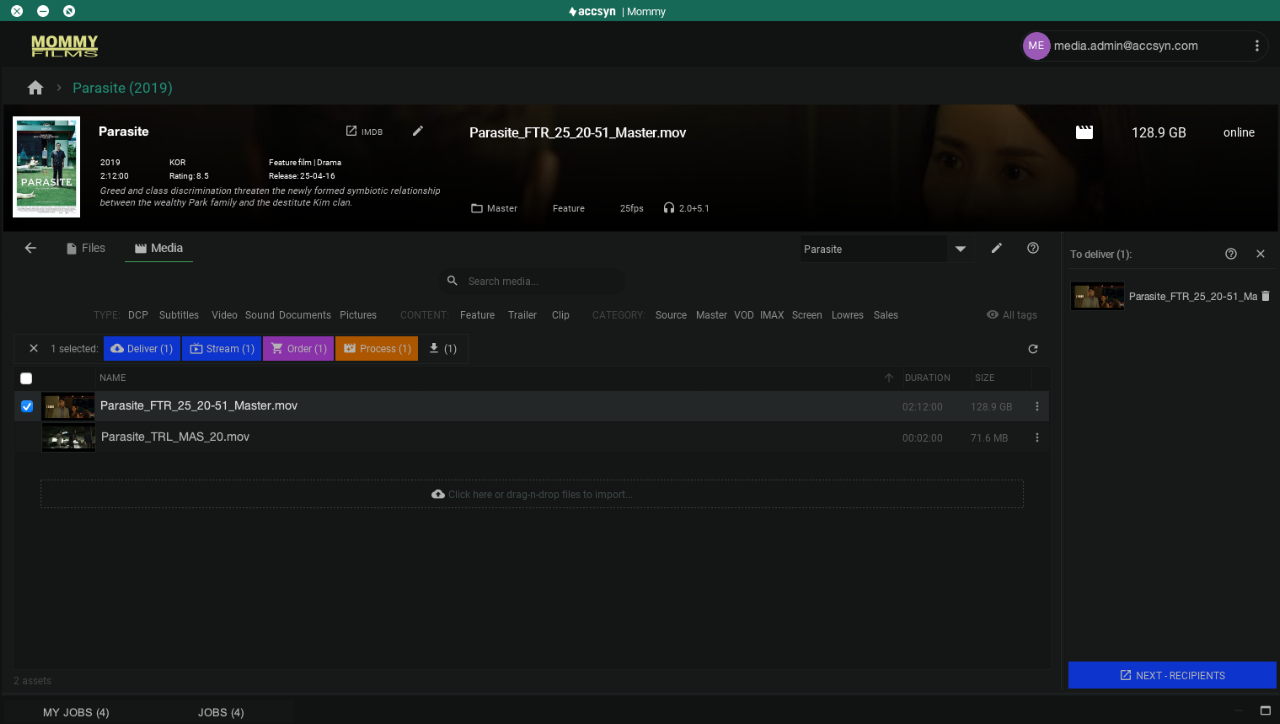
Items appear in the cart on the right. Remove entries with the trash can.
From the title Files view you can also right-click a file or folder → Deliver.
- When the package is ready, click NEXT — RECIPIENTS.
A browser window opens on the standard delivery page so you can add recipients, expiry, and access options. Details: Create a delivery. Recipients can follow Receive a delivery.
Monitor deliveries
Prefer https://accsyn.io/outbound in the browser for full status and editing. The Desktop App JOBS tab (bottom area) gives a shorter overview.
Next: Process media — transcode masters for VOD, streaming, and related formats.