Export
Package tagged video with subtitles and related assets into packages that VOD platforms can ingest.
Currently supported natively:
- Allente
For other popular platforms, see Media Lab.
Allente
- Transcode VOD media from a high-resolution master with the Processor. Recommended: HD ~25 Mbit H.264 with ~256 kbit stereo.
- For each region (language), log landscape, portrait, and shot poster images; log subtitles for that language; optionally a trailer with subtitles.
- Select the VOD media and open the processor.
- Open the VOD export tab and choose the Allente exporter:
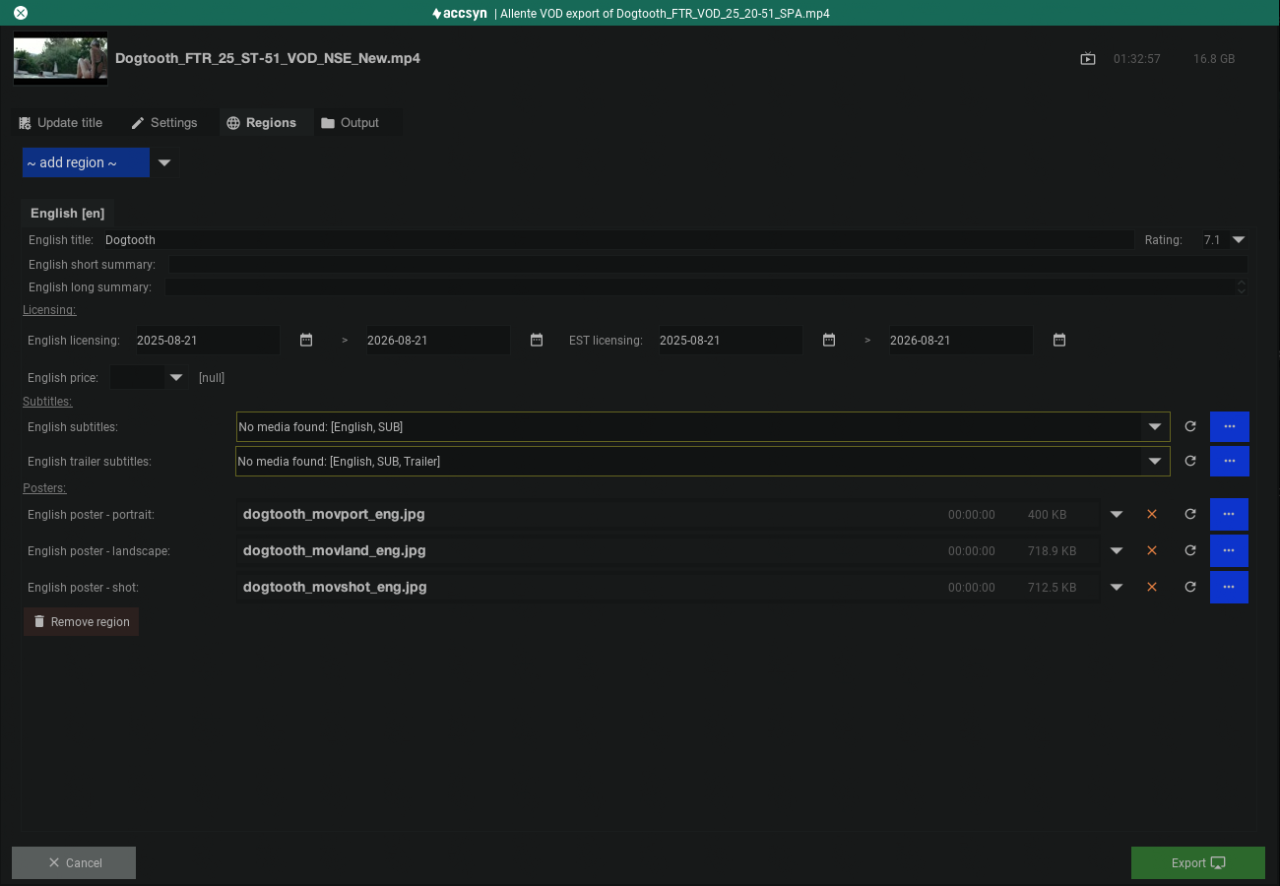
The exporter shows a media preview and four tabs:
Update title
Add title metadata that was missing at creation but is required for export.
Settings
- Customer — N/A
- Type — SVOD, TVOD, or EST
- Trailer — Trailer to include
Regions
Per language / region:
- Title, short summary, long summary in that language
- Licensing — Date range the platform may stream
- Price for viewing / renting
- Subtitles — Main (and optional trailer) subtitles
- Posters — Region-language posters
- Remove region
Output
- Deliver (temp) — Deliver to recipients from a temporary folder deleted when the delivery expires
- Deliver (custom) — Store permanently on storage, then deliver from there
- Custom — Store on storage only
Click Export to run on the farm. Missing required fields are reported.
Note: Not every field is required for Allente (for example a trailer may be optional).
Monitoring export
Watch the JOBS tab at the bottom of the app. Contact support if something looks wrong.
Back to processor.