accsyn Media Vault — introduction
The Media Vault lets you tag deliverable media on accsyn Cloud storage so you can manage masters and related assets with structure, proxies, streaming, export, and lab workflows — while large uploads and deliveries still run over the secure, accelerated ASC protocol.
Use it to host film masters and deliverables with media proxies, transcoding, streaming, export tooling, lab services, and more.
Important: Media Vault is available on accsyn Cloud storage only — not on BYOS (on-premises) workspaces at this time.
Get started
Watch this video to get up and running with the Media Vault:
Tutorial
Set up a vault workflow step by step:
What is the Media Vault?
accsyn adds media-management capabilities on top of files that live on accsyn Cloud storage. You organise deliverables under titles (movies, TV series, short films, general projects, and so on) and tag associated media so the platform can drive:
- Structured title libraries that are easy to search, with IMDb linkage where applicable
- Streamlined, accelerated delivery of DCPs, masters, sound, sales material, pictures, and video — via ASC when using the Desktop App
- Accelerated upload of media into titles (ASC)
- Collaboration for collaboration with vendors, partners, and clients
- Web streaming so recipients can watch title media in a browser — no extra player software
- Clip and still extraction — transcode selected ranges from masters to ProRes, H.264, or TIFF/JPEG
- Export tooling aimed at established SVOD/TVOD vendors
- Optional Lab services when you need partners to refine assets
Tagging is what turns ordinary files on cloud storage into managed deliverables; ASC is what keeps moving those large packages fast and secure.
How does it work?
The Media Vault works alongside Deliveries and File Sharing on accsyn Cloud storage. Accsyn separates file and media management into two phases:
- Film production / media refinement — Covered by Delivery, File Sharing, and Workflow tools. Media is not logged in the Vault by default during this phase (you can still log items manually if you wish).
- Film distribution / archival — Masters and related deliverables are ingested as media into the Vault: proxies are rendered and metadata is extracted. Delivery and File Sharing remain available during distribution — for example when mastering a DCP or delivering to VOD platforms.
A title can still live as a single root folder on storage: production can continue inside that folder, with final masters stored there at wrap.
BYOS exception: Media Vault cannot currently run on-premises because proxy and transcode engines are cloud-backed. If you need on-prem production storage plus Vault features, use a separate Cloud workspace for final master media.
Titles
An accsyn title is a root folder on Cloud storage that holds media for a specific movie or TV show (identified by IMDb ID) or a general local media project.
On creation, accsyn can fetch movie metadata from IMDb to bootstrap the library. Titles support a cover image and an optional banner for clearer listing and richer delivery presentation:
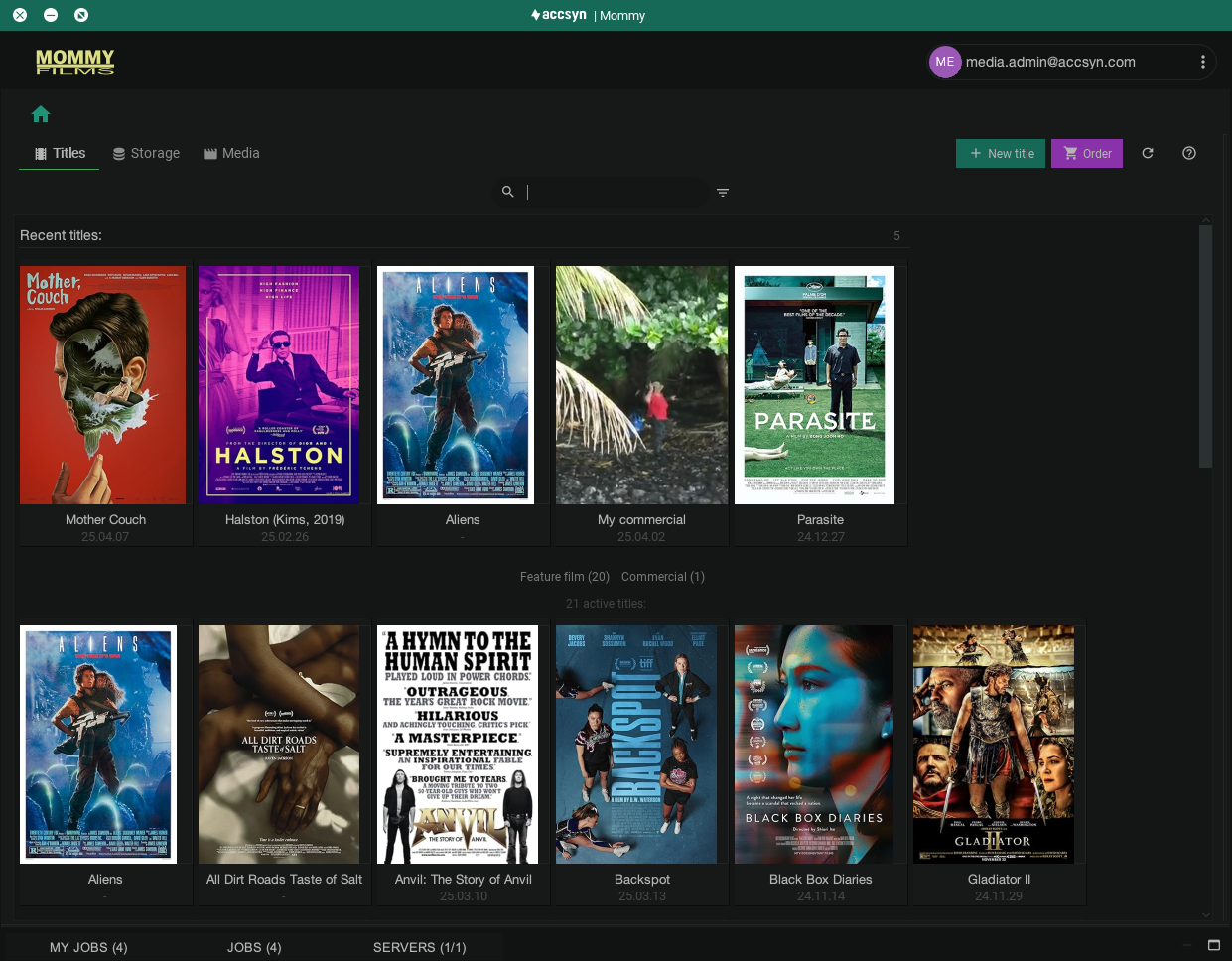
Example title listing in the Desktop App.
When you upload media to a title, you can let accsyn sort it into a standard category-based folder layout, or manage folders yourself.
Media
A media asset is a file or folder beneath a title, tagged with attributes that describe format (technical) and role in your delivery pipeline. Accsyn probes the media to give a solid technical view of video and audio streams.
Once tagged, media can take part in advanced Vault operations: automated transcoding, streaming, DCP-related workflows, and VOD delivery.
Example tags:
- Type — VID (video), SND (sound), PIC (picture), …
- Content — FTR (feature), TRL (trailer), CLIP (clip)
- Category — MAS (master), DCP, VOD, SALES
- Audio — 20 (stereo), 51 (surround)
- Season — S01, S02, …
Tagged media is easy to find without relying only on deep folder trees or opaque filenames.
Delivering
Media delivery is enriched by the proxy engine — title cover and banner, plus thumbnail and video proxies. A delivery can mix tagged media with ordinary files and folders. Large packages still benefit from ASC through the Desktop App.
With a host daemon / User server, deliveries to remote endpoints (clients, cinemas, showrooms) can complete without someone at the receiving machine operating the Desktop App.
Transcoding
After master media is logged (Category: MAS), you can transcode into defined deliverables such as:
- Clips and stills — ProRes or H.264 subclips; stills as TIFF or JPEG
- VOD — further streamable proxy (HD HLS)
- Lowres — proxy with timecode burn-in and related options
- Proxy — 1280×720, ~2 Mbps preview
- Thumbnails
Accsyn Cloud storage is backed by an ffmpeg farm for proxy-style transcodes; proxy transcoding is included without an extra charge under current Cloud offerings.
Web streaming
Video media can be sent as a streaming delivery to one or more recipients. They receive an email with a link for account- and/or password-protected playback in the browser. A streaming delivery may mix streams, other media, and standard files and folders.
Once an HD streaming proxy has been transcoded, recipients can watch in a normal web browser.
Lab services
The media add-on was first built in-house for a major customer to support streamlined lab services. Those services are now provided with partner FyraK media and include:
- General media work — guidance on the Vault and help importing an existing library
- DCP mastering (Digital Cinema Packaging)
- Advanced AI upres
- VOD export for major stream vendors (Netflix, Viasat, Disney+, and others)
- Media QC — checking for artefacts
- Colour grading and general post-production
- Content digitising
- Editorials
…and more. Select media in accsyn and place a lab order from the app.
Contact us via chat (lower right) or support@accsyn.com to learn more.
Next: Create your first title.
Related articles:
Delivery — file delivery subsystem.
Collaboration — share titles with sales teams, vendors, partners, and end users.
Lab services — experienced media lab staff for deliverables.